This post is guiding you to set a restriction which can keep users out of typing duplicate values into cells. There are some kinds of data that are regarded as unique values like identiffication number (employee ID, passport number, telephone number,…)
Bài viết này mình hướng dẫn các bạn cách thiết lập hạn chế chặn người dùng nhập các giá trị trùng lặp. Những giá trị được xem là không thể trùng lặp gồm: mã nhân sự, số hộ chiếu, Căn Cước Công Dân, số điện thoại,…)
In Excel, select a range you want to apply input limitation, in this example, I refer to a range A2:A1000 in column ID, you can expand your selection if needed:
Tại Excel, chọn vùng dữ liệu bạn muốn thiết lập giới hạn dữ liệu nhập vào, trong ví dụ này, mình sử dụng vùng A2:A1000 trong cột ID, bạn có thể mở rộng vùng chọn nếu cần thiết:

Next, at the Tab Data, open Data Validation box. Select Custom and type the formula as follow:
Tiếp theo, tại thẻ Data, mở hộp thoại Data Validation. Chọn Custom và nhập công thức bên dưới vào:
=COUNTIF($A$2:$A$100,A2)=1
Formula explanation: count every single cells (A2, A3, A4,…) through the range (A2:A100). For example, you initially input “123” onto cell A2, the formula will return 1. Everything is okay. Then, you add “123” onto cell A3, the formula will return 2, not equal to 1. This rule will immediately stop you, don’t permit you input the same value twice.
Giải thích hàm: đếm qua lần lượt các ô (A2, A3, A4,…) trong vùng A2:A100. Ví dụ, bạn nhập “123” vào ô A2, hàm sẽ trả về 1, mọi thứ lúc này ok. Sau đó, bạn nhập tiếp “123” vào ô A3, hàm sẽ trả về 2, không bằng 1. Luật này ngay lập tức chặn bạn, không cho phép bạn nhập cùng nội dung hai lần.
Further settings if required, Input Messeage and Error Alert, then click Ok to finish settings:
Bạn có thể thiết lập thêm Input Message và Error Alert, sau đó bấm OK để hoàn tất thiết lập:


Check your work:
Kiểm tra các thiết lập:

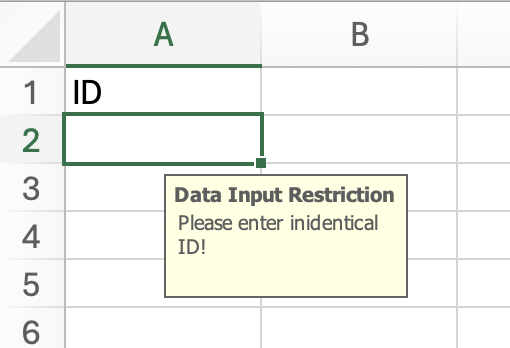
When users activate a cell within a range A1:A100, an input message will appear reminding users the restriction.
Khi người dùng chọn ô trong vùng A1:A100, một tin nhắn sẽ xuất hiện nhắc luật cho người dùng.

An error alert immediately appear when users try to input them same ID into any cells within this range.
Một cảnh báo ngay lập tức xuất hiện khi người dùng đang cố nhập trùng ID vào bất kỳ ô nào trong vùng này.
Give it a try and good luck!
Your message has been sent

 phamnguyenkhanh.home.blog